Check your doorway.
Measure the inside of your doorway opening. Quiet Punch fits doorways 28 to 36 inches wide.

28 to 36 inches wide. Under 60 seconds to set up. No tools. No drilling.
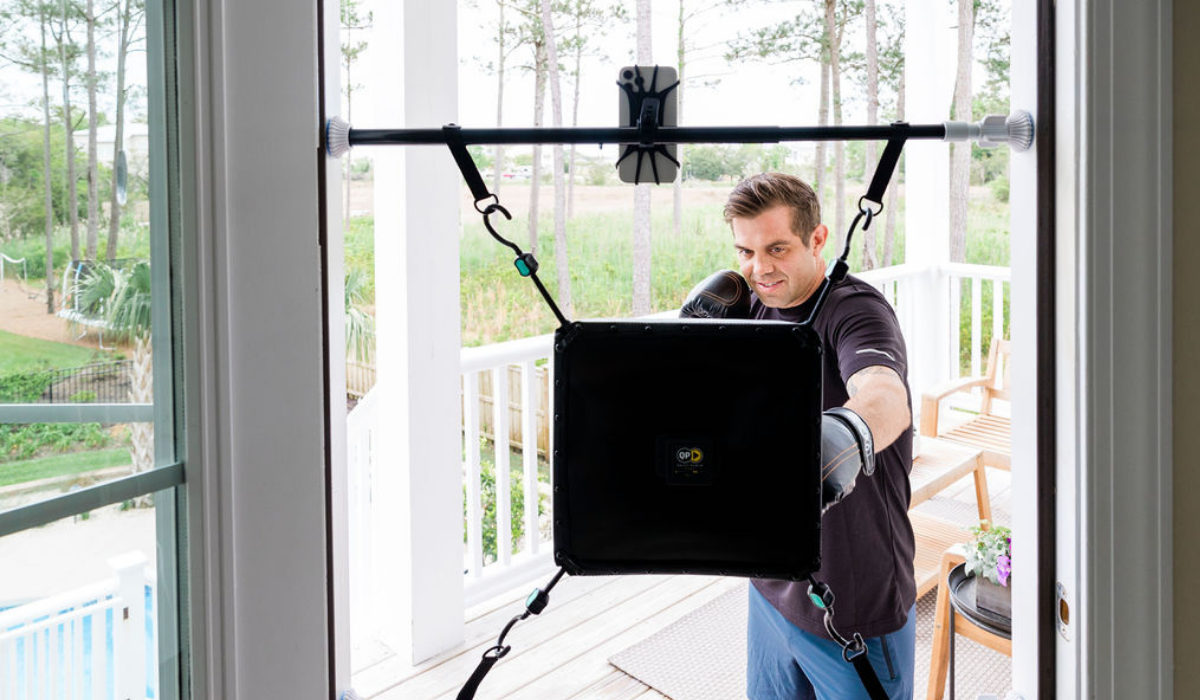
Measure the inside of your doorway opening. Quiet Punch fits doorways 28 to 36 inches wide.
In the box you will find the punching bag, two doorway bars, the phone holder and slip discs. Expand the top and bottom bars and choose the pin hole that fits your doorway.
Position the top bar slightly above your head. Turn the knob until the bar is snug in the doorway, then hold the bar with both hands and twist to add tension. On glossy door frames, use the slip discs.
Hook the bag onto the straps on the top bar.
Position the bottom bar below the bag's bottom hooks, tension it the same way, and hook the bag on. The whole setup takes less than 60 seconds, with no tools and no drilling.
Welcome! In your package you will find 2 telescoping bars, punching bag, phone holder, and punch tracker (if purchased the tech version). Please see the quick setup video below and follow the individual steps for Using the Phone Holder and Attaching the Punch Tracker.
*In the video please be sure to take note that you need to use BOTH hands to rotate the bar. This makes sure that you get the necessary tension to prevent the bar from sliding.
The phone holder is meant to be wrapped around one of your Quiet Punch bars and then you use the webbing to hold your phone. This is a great way to experience the app. The holder fully rotates so you can be in both portrait and landscape mode.


Please use the supplied screws to secure the sensor to the back of the bag. Please use a Philips Head screwdriver (ideally a power screw driver) and press down hard as you screw the screw into the back of the bag. Once the screw attaches you will feel it bite and then you can continue screwing until it is firmly attached to your bag.

Perfect for glossy doorways and when you notice that even after significant tightening of the bars that they still seem to slide down when punching.
The best length for a jump rope is to make sure that if you are stepping on the rope, the handles should reach just under your armpits.


Only purchased the Basic version and you don't have a punch tracker? You can upgrade anytime by going here: Punch Tracker
Please make sure that your sensor is fully charged. The red light is on when it is charging and turns off when it is fully charged. Press the button once on the sensor. (The sensor will turn off automatically after 10 minutes of inactivity)
*A full charge should last you at least 20-30 workouts.
Android
Open up the Play app and the app will automatically search for the sensor. It will display the sensor that it finds. Click on the name of the sensor that it finds and it will connect to it. See this demo video for an example: https://www.youtube.com/watch?v=qv3rDGakoAc The app will stay paired to the sensor until you click the button to search again and this will un-pair it.
iPhone
Click on Settings Scroll down to find the Quiet Punch Play app Make sure that you enable Bluetooth (this is Bluetooth specific to the app not your Bluetooth settings overall) Open up the Play app and the app will automatically search for the sensor. It will auto connect to every screen. To test that it is working properly, click on the Training -> Free Style screen and you should see a green box that says connected so you know that the sensor is working properly.
Tracker installation has its own guide.
Find help with your Quiet Punch app.
Get in touch before setting up.